CHANGE INPUT · TWO SYNTHETIC FILES
MP3 to MIDI: Does changing the file clear the previous result?
In our two-file synthetic MP3 test, selecting a different input hid the previous result and removed its download link. Converting the new file then produced a new MIDI. The already saved first MIDI remained unchanged. This describes one browser run, not every recording or device.
Choose the next audio file, wait for its conversion to finish, then download the new result. A filename in the input area alone is not evidence that a new MIDI exists.
What actually changed between input A and input B?
We reused our own short melody MP3 as input A and generated a different four-second synthetic melody as input B. Both files were processed by the unchanged local copy of this converter with the real transcription model. We used a fresh independent Chrome context, not a visitor's recording or an authenticated personal browser. Test-only local HTTP policy restricted network destinations to local resources, preventing external analytics traffic.
A completed first. The result label identified input-A.mid, four notes and four seconds. Its downloaded MIDI contained 72 bytes. Parsing the saved file yielded pitches 60, 64, 67 and 72. We then used Change file and selected input-B.mp3 without refreshing or converting it yet.
At that intermediate step, the visible result disappeared and the download href was absent. The selected filename identified B and the conversion button was enabled. Importantly, the old A result label still existed inside the hidden result panel. This is evidence of hiding and unlinking an old result, not a claim that every old text node was erased.
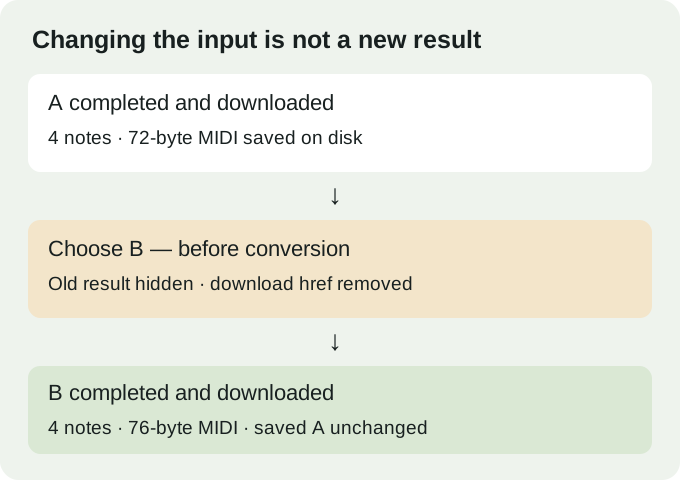
After converting B, the label identified input-B.mid with four notes. We deliberately downloaded it and parsed the 76-byte MIDI. B's planned pitches were 62, 65, 69 and 74; the parsed output had that same sequence. The measured starts were 0.209375, 0.998958, 1.8 and 2.602083 seconds against planned starts of 0.2, 1, 1.8 and 2.6 seconds. The pitch agreement does not mean that timing and duration were exact.
Finally, we rehashed the already downloaded MIDI A. Its bytes were unchanged after B completed. Different output hashes were not our accuracy test: we inspected the note events and compared B with the disclosed input plan. The experiment separates three things that can otherwise be confused: the selected audio, the page's current result link, and a file already saved to disk.
Source inspection provides an explanation, not another browser experiment: selectFiles calls clearResult before accepting a new input. That function hides the result, removes the href and revokes the old object URL. It does not delete a previously downloaded file. The observed hidden A label is consistent with that narrower implementation boundary.
Will changing the input delete a MIDI I already saved?
Not in this test: the first saved file's hash was identical before and after the second conversion. A local saved file is separate from the current page link. Keep distinct filenames when comparing attempts so that your own save workflow does not overwrite an earlier result.
How do I check which input a result belongs to?
Check the selected filename, wait for a completed result, and inspect the downloaded MIDI. In this experiment, the B result label and the parsed B pitch sequence both identified the new conversion; a changed hash by itself would not have established correct notes.
Limits of this result
This run used Chrome 154.0.8037.59 and two short synthetic MP3 inputs. We did not test every format, browser, long recording, concurrent conversion or note-editing application. Selecting a file during an active conversion is a different question. This page does not promise perfect transcription.