TIMING CHECK
MP3 to MIDI starts late? Check the first note
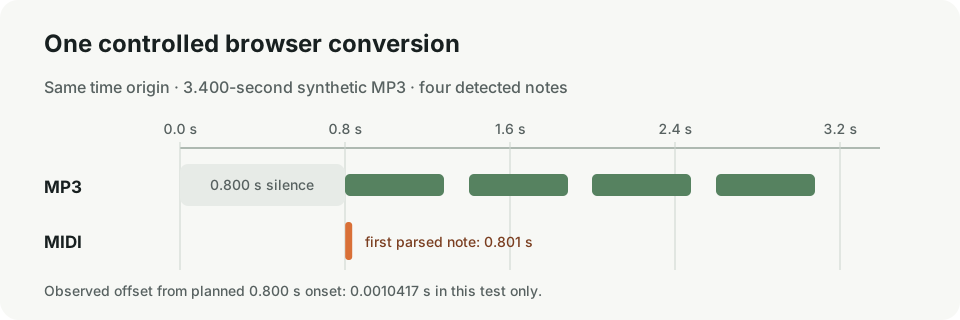
A late first MIDI note may simply match silence at the start of the MP3. In one controlled test with 0.800 seconds of leading silence, this site's browser converter placed the first MIDI note at 0.801 seconds—about 0.001 seconds after the intended onset. That is one synthetic four-note test, not a guarantee for other audio.
Before moving a MIDI clip, compare its first note with the beginning of the audio. If both begin together on your timeline and the first note appears after an empty stretch, the source may contain an intro or count-in. Moving only the MIDI can make the notes less aligned with the recording.
A repeatable leading-silence test
We generated a 3.400-second mono fixture with four synthetic notes intended to begin at 0.800, 1.400, 2.000, and 2.600 seconds. The first 0.800 seconds contain digital silence. We encoded that waveform as MP3, selected it in the live browser converter, downloaded the resulting Standard MIDI file, and read its note events with a MIDI parser. The MP3 SHA-256 is f060b5864650a5e615672f39b243b826a3e8cc0cd3eaa4cf69a6d1309ebad54c.
The source waveform was mono, 44.1 kHz, and 16-bit PCM before MP3 encoding. Its four generated pitches were MIDI note numbers 60, 64, 67, and 72; each tone was scheduled for 0.480 seconds. The intended start times and parsed event times are listed side by side below, rather than rounded into a claim about general accuracy.
| Check | Observed value |
|---|---|
| Source duration | 3.400 seconds |
| Silence before first intended note | 0.800 seconds |
| Intended first note | 0.800 seconds |
| First parsed MIDI note | 0.8010417 seconds |
| Difference in this test | 0.0010417 seconds later |
| Detected notes | 4, matching the four generated tones |
| All planned → parsed note starts | 0.800 → 0.801042 s; 1.400 → 1.405208 s; 2.000 → 1.985417 s; 2.600 → 2.602083 s |
The fixture uses synthesized tones, not a song, instrument performance, or human recording. The result only describes this file and this run. The original MP3, downloaded MIDI, and machine-readable note list are available below so the timing can be checked independently.
Test files: source MP3 · converted MIDI · parsed note events.
How to check your own first note
- Put the original MP3 and converted MIDI at the same start point in your music editor.
- Zoom in at the beginning. Compare the first visible audio activity with the first MIDI note, not just the file edges.
- If the audio itself has an intro or count-in, decide whether you want to keep it. If you remove that section, move or trim the audio and MIDI consistently.
- If the MP3 has no opening silence but the first MIDI event is still displaced, inspect the conversion and alignment rather than assuming every export should begin at time zero.
These are alignment checks, not editing controls in this website. The converter creates a downloadable MIDI in your browser; use a separate MIDI editor or DAW to inspect or change note placement.
Does MP3 to MIDI remove silence before the first note?
There is no universal result established by this test. Here, the exported note event remained close to the planned 0.800-second onset. Your recording, encoding, detected notes, and editor can differ. Compare the event to the audio you supplied before correcting it by ear or dragging it.
Should I move the MIDI file left?
Only after checking where the audible performance begins. If silence is intentional, the note's later position may be correct. If you do move a clip, compare it against the original audio again so the first note does not drift away from its sound.
What if the opening note is missing?
A timing offset and a missing note are different problems. Check whether a note exists in the MIDI at all; related guides below cover a no-result message and a file that seems to end before the audio.