AUDIO PREPARATION
Audio plays, but MP3 to MIDI says it is silent?
Check whether the sound disappears when the stereo channels are combined. Opposite left and right waveforms can cancel before this converter detects notes. If either channel contains the melody on its own, export that channel as a new mono file and retry. Simply merging both channels into mono can repeat the problem.
This is one specific cause of a silence warning, not a diagnosis for every failed recording. If both channels are already quiet, damaged or missing the melody, use the general conversion error guide instead.
Why combining stereo can remove the signal
The browser decoding path in this tool renders audio into one channel before note detection. The Web Audio specification's stereo-to-mono rule averages left and right: mono = (left + right) / 2. If right is an inverted copy of left, their sum cancels. This does not mean the original file has no signal in its individual channels.
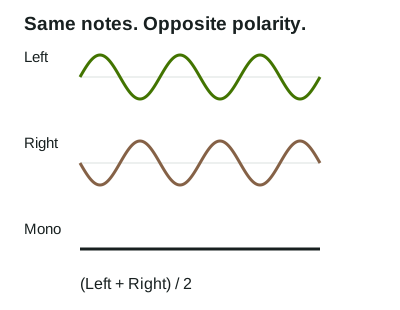
Our controlled test: change only the channel relationship
We generated a four-second melody with the pitches C4, E4, G4 and C5. It is synthetic test audio, not a commercial recording. From the same mono source, we made a stereo copy with identical left and right channels and another with the right channel inverted. We encoded both stereo versions as MP3 and retained the original left channel as a mono WAV.
We selected each file in a local copy of the unchanged mp3tomidiflow page and pressed Convert to MIDI in Chrome. The normal stereo WAV, normal stereo MP3 and left-only WAV each produced a download showing four notes. We also read the generated MIDI bytes with a separate MIDI parser, which counted four notes in each successful result. That count describes these fixtures; it is not an accuracy guarantee for another recording.
| Input | Mono RMS | Page result |
|---|---|---|
| Matching-channel WAV | 0.174543 | 4 notes; MIDI available |
| Opposite-channel WAV | 0.000002663 | Silence warning; no MIDI |
| Matching-channel MP3 | 0.174546 | 4 notes; MIDI available |
| Opposite-channel MP3 | 0 | Silence warning; no MIDI |
| Left-only WAV | 0.174543 | 4 notes; MIDI available |
RMS is the square root of the average squared sample value, measured after browser mono rendering. The values above are rounded from our raw results. This version rejects audio below an RMS of 0.00001. Both opposite-channel fixtures fell below that threshold, although each decoded input channel had an RMS near 0.1745. The page displayed: “This recording is silent or too quiet. Choose a clearer recording. No MIDI was generated.”
The opposite-channel WAV left a small residual in this browser's decoding and resampling path; the MP3 result measured zero. We do not assume every browser or MP3 encoder will return identical values. The useful observation is that the tested files crossed the silence threshold, while keeping only the left channel restored an input from which the tool generated MIDI.
Try the same files
Download a sample, open the MP3 to MIDI converter, select that file and convert it. Compare the result message before trying the next sample. These small synthetic files are provided for reproducing this test.
Prepare your own recording
- Keep the original. In your audio editor, listen to the left and right channels separately, then compare a mono sum.
- If the melody disappears only in the mono sum, export the channel that contains the desired part as a separate mono file. Check the export by listening to it.
- Convert that new file. This site has no channel-selector control, so prepare the channel in your editor before selecting it here.
Keeping one channel discards anything present only in the other. Use this approach when the chosen channel contains the part you need; it does not separate instruments from a mix.
Will turning the volume up fix it?
For exactly opposite channels, applying the same gain to both still leaves an average of zero. A separate channel export changes what enters the converter. If your mono preview retains the melody, cancellation may not be the problem; check the actual error message and source audio instead.
Tested on September 27, 2026 with Chrome 153.0.8010.54 using the browser decoding path. These results do not cover the fallback decoder or every kind of stereo recording. For the contents of a successful download, see what this tool writes into MIDI.