MIDI EXPORT DETAILS
MP3 to MIDI ends early? Check the note events
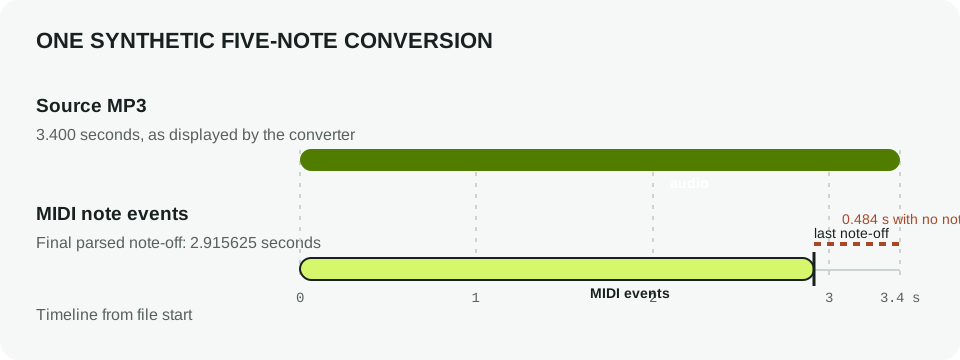
A MIDI export can be shorter than its MP3 because MIDI stores detected note events, not the source audio waveform or its trailing silence. In one reproducible five-note test, the converter reported a 3.400-second source while the final parsed MIDI note ended at 2.916 seconds. The remaining 0.484 seconds had no note event in that file. This is an observation from one synthetic sample, not a promise about every conversion.
When an MP3 to MIDI converter appears to cut off early, compare the last audible sound with the final MIDI note-off. A quiet tail, reverb, or a sound the converter did not recognize may have no corresponding MIDI event. MIDI is event data for notes and timing; it is not a rendered copy of the MP3.
A repeatable test from this converter
We generated an original monophonic audio fixture with five synthetic notes beginning at 0.000, 0.600, 1.200, 1.800, and 2.400 seconds. The fixture-generation source writes the notes and audio tail explicitly; its MP3 SHA-256 is 7e3d3e229da6ad0532f9bdd540253e49b1bec35b3baab99326e223726ecdf13e. No commercial recording or third-party song was used.
We selected that MP3 in the browser converter and ran Convert to MIDI. The page displayed “tempo-100.mid · 5 notes · 3.4 seconds.” We downloaded that result and parsed its Standard MIDI File events. The last note began at 2.38125 seconds and lasted 0.534375 seconds, so its note-off was at 2.915625 seconds. Subtracting that event end from the displayed source duration gives 3.400000 − 2.915625 = 0.484375 seconds without a MIDI note event.
| Measurement | Observed value | Evidence |
|---|---|---|
| Source audio duration | 3.400 s | Converter result displayed 3.4 seconds. |
| Detected MIDI notes | 5 | Converter result displayed five notes; MIDI parser found five note-on/note-off pairs. |
| Last MIDI note-off | 2.915625 s | Final parsed note: start 2.38125 s, duration 0.534375 s. |
| Audio after final note-off | 0.484375 s | 3.400000 s source duration − 2.915625 s final note-off. |
The source generator, tested MP3, downloaded MIDI, and parser output are linked below. You can inspect the MIDI events yourself or import the MIDI and MP3 together into a DAW. The test establishes what happened for this controlled input only; a polyphonic mix, reverberant instrument, or different export may produce a different ending.
Repeat the test: synthetic MP3 source · downloaded MIDI result · parsed MIDI events · fixture-generation source.
How to check a short MIDI export
- Play the MP3 and note when its last audible sound ends.
- Open the MIDI in a piano roll and inspect the final note's right edge; that edge is the note-off.
- If the MP3 continues after the note-off, listen for silence, reverb, or a sound that did not become a detected note.
- If you need the full tail in a finished track, keep the original audio alongside the MIDI or render the audio tail separately in your DAW.
A MIDI note-off is not the same as the end of an instrument's audible decay. A piano, pad, or reverb can continue sounding after the MIDI event has ended. Keep the source MP3 when that audio matters.
Why this does not mean the file is corrupt
A Standard MIDI File describes musical events and timing. It does not contain the original MP3 waveform. A shorter event timeline can therefore be a normal consequence of the converted notes ending before the audio file does. Check that the MIDI opens and that its note events are present before treating a duration difference as a failed download.
This page reports one test run on September 28, 2026 using Chrome 153.0.8010.54 and a locally generated fixture. It does not measure conversion quality across other music, browsers, or services. For a format-level explanation of a MIDI download, see what is in an MP3 to MIDI download? For the converter's documented input and output, use the MP3 to MIDI tool.
Sources and test files
- MIDI.org, Standard MIDI Files.
- Local measurements: parsed event data and fixture source.